
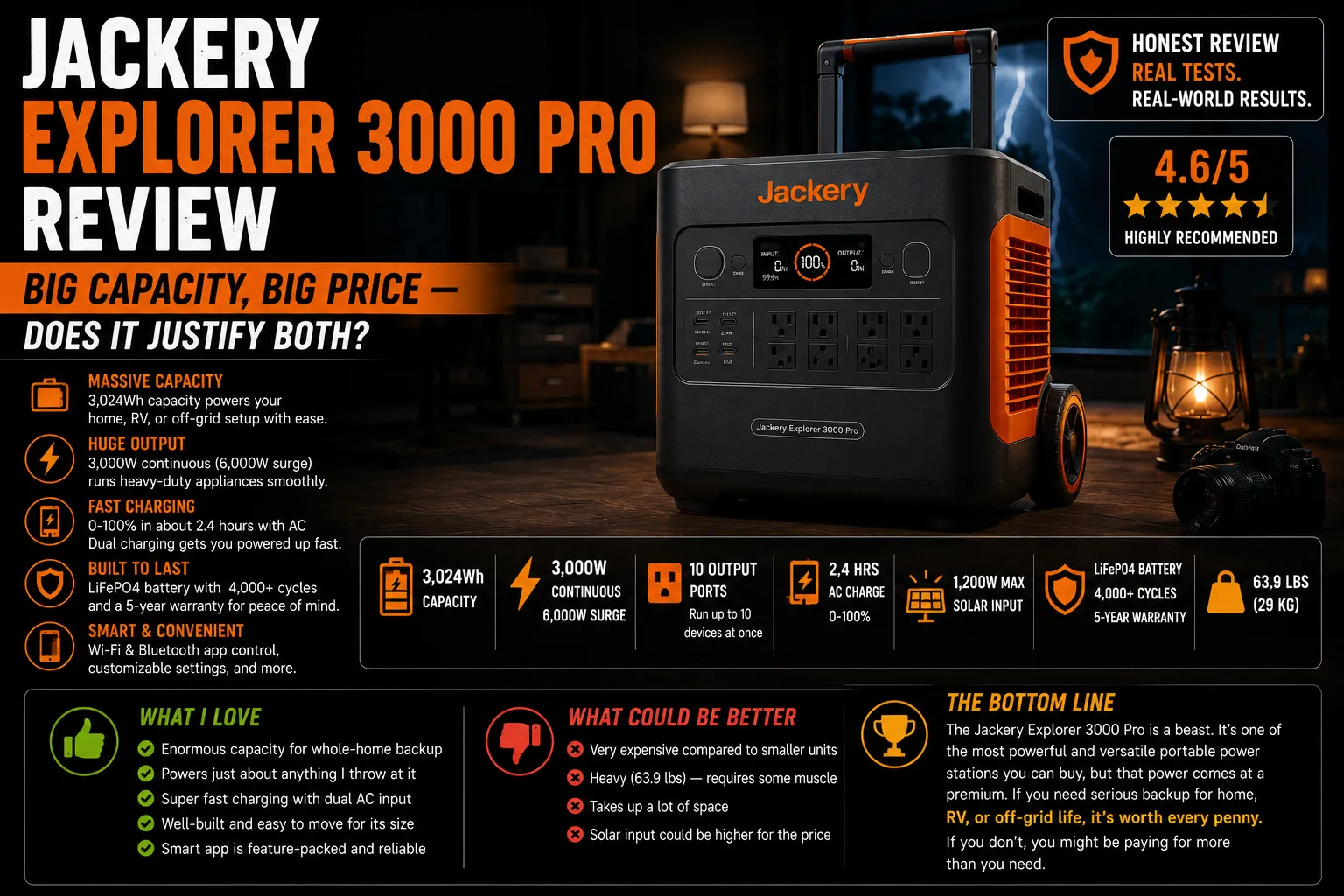
3,024Wh. Just writing that number requires a moment of pause, because it represents about three times the capacity of the entry-level units most homeowners start with — and a price tag that sits comfortably in the $1,699–$2,299 range depending on when you buy. The Jackery Explorer 3000 Pro is a substantial machine, and before I say anything else about it, I want to put one thing on the table: a unit this large is the right answer for a specific homeowner, and the wrong answer for most.
I covered this in more general terms in why the biggest unit isn’t always the right one. The 3000 Pro is where that argument gets tested against a real product.
What You’re Actually Getting
| Spec | Jackery Explorer 3000 Pro |
|---|---|
| Battery capacity | 3,024Wh |
| Battery chemistry | LiFePO4 |
| AC output | 3,000W (6,000W surge) |
| Max solar input | 1,500W |
| AC charging speed | Up to 3,000W (full charge in ~1.8 hrs) |
| Weight | ~63 lbs |
| Expandable? | No (fixed capacity) |
| Cycle life | 4,000 cycles to 80% |
| Dimensions | 20.8 × 10.9 × 15.0 in |
The 3,000W AC output handles almost any standard home appliance — window AC units, chest freezers, power tools, and most refrigerators sit well within that ceiling. The 6,000W surge covers the compressor startup on essentially any residential unit.
The 63-lb weight is a two-person lift if you’re moving it across a threshold or up a step. On flat ground with the carry handle, one reasonably fit person can manage it, but it’s not comfortable. Plan where it lives before it arrives.
Ray’s First Observation
Ray had looked at the 3000 Pro specs for a client installation before I brought it up. His assessment was direct: “For a homeowner who doesn’t want a transfer switch but wants serious coverage, this is a better option than anything under $2,000. But it’s not a generator. It doesn’t run forever.”
That’s exactly the framing the 3000 Pro deserves. It’s a large, high-quality battery backup — not a replacement for infrastructure-level power generation, but a meaningful step toward it.
His one hesitation: “The weight will surprise people. They see 63 pounds and think they can manage it alone. Then it shows up and they can’t get it off the porch by themselves.” He now tells every client considering a unit above 50 lbs to have a second person or an appliance dolly ready on delivery day.
⚠️ Related to Ray’s point: the 3000 Pro does not have wheels or integrated rollers. At 63 lbs, moving it more than a few feet requires either two people or a furniture dolly. I moved mine once using a hand truck — the carry handle made this manageable. I would not recommend trying it on stairs without another person steadying the bottom.
Runtime Test: What 3,024Wh Gets You
Test setup: Two-day indoor test, ambient 84°F. Load varied between overnight survival mode and daytime comfort mode.
Survival mode load: Refrigerator (52W avg), CPAP without humidifier (28W avg), two LED lamps (16W total), phone charging (12W). Total: ~108W average.
At 108W average load, runtime to 10% remaining: approximately 23–24 hours. Effectively, one full day of moderate critical-load coverage from a single full charge.
Comfort mode load: Refrigerator (52W), window AC (510W avg measured), CPAP (28W), LED lights (16W), device charging (20W). Total: ~626W average.
At 626W, runtime to 10% remaining: approximately 4.4 hours. Running an air conditioner burns through even a 3,024Wh battery faster than people expect.
This is the honest math that most product pages skip. Yes, the 3000 Pro can run your window AC. It can run it for about 4–5 hours. That’s enough to cool the bedroom for sleeping — it’s not enough to run the AC continuously through an 18-hour summer outage. Managing that expectation matters before the purchase.
Solar Charging: The 1,500W Ceiling
The 3000 Pro accepts up to 1,500W of solar input — meaningful at this capacity level. At real-world efficiency of ~75%, four 220W panels (totaling 880W real output) would recharge a 3,024Wh battery in roughly 3.5–4 hours of peak sun.
That’s a genuinely useful solar recovery scenario, but it requires four panels — which is a real installation commitment, not a “prop one panel against the fence” setup. For homeowners serious about solar-plus-storage, this unit’s solar ceiling supports a meaningful array. For homeowners with one or two portable panels, a unit this large still requires 12–15 hours of real solar input to fully recover from 0%, which means multi-day recovery in anything less than optimal conditions.
Jackery rates the 3000 Pro’s AC recharge at up to 3,000W — so from a standard 15A circuit (limited to about 1,440W safely), a full charge takes roughly 2–2.5 hours. From a dedicated 20A circuit or a generator, it can hit closer to its rated speed.
App and Software
Same Jackery app as the smaller units — functional, clean, no major surprises. Battery level, charge/discharge rates, estimated runtime, input source. Remote access via WiFi works reliably in my testing.
One note: the 3000 Pro’s display is bright and clear, with a more detailed information layout than smaller Jackery units. Estimated runtime in particular is displayed prominently. I find this genuinely useful during outages — knowing “4h 22m remaining” at the current load helps with planning. This calculation updates in real time as loads change.
Noise Level
The 3000 Pro runs a cooling fan during both charging and high-output discharge. At mid-to-high loads, the fan is audible — roughly in the range of a desktop computer under load, not a generator, but not completely silent. At low loads (under 200W), the fan cycles down and the unit is nearly quiet.
For placement in a bedroom or home office during an outage, the fan noise is something to consider. In a garage or utility room, it’s a non-issue.
Price vs. EcoFlow DELTA Pro
The honest comparison most homeowners considering the 3000 Pro will run is against the EcoFlow DELTA Pro (3,600Wh, similar price range, $2,200–$2,799 on sale).
The DELTA Pro has more capacity (3,600Wh vs 3,024Wh), a larger solar input ceiling (1,600W vs 1,500W — essentially equivalent), and EcoFlow’s software advantage. It’s also expandable — adding the DELTA Pro Extra Battery takes it to 7,200Wh.
The 3000 Pro has Jackery’s build quality edge, 4,000 cycle LiFePO4 cells, and a track record I trust. It does not expand.
If software and expandability matter to you: DELTA Pro. If build quality consistency and brand longevity matter more: 3000 Pro. Both are strong units. Neither is the wrong answer.
From my experience with the 2000 Plus, Jackery’s build quality scales well to larger units — the 3000 Pro feels like a bigger version of the same thoughtful engineering, not a different product philosophy stretched to a larger chassis.
What I’d Change
Two things genuinely annoy me:
One: no expansion path. A 3,000Wh unit is large enough that some homeowners will eventually want more. The DELTA Pro ecosystem lets you expand; the 3000 Pro doesn’t. If there’s any chance your needs will grow, this is worth factoring.
Two: no wheels. At 63 lbs, this unit needs wheels. The EcoFlow DELTA Pro Ultra has wheels; the DELTA Pro has a single carry handle; the Jackery 3000 Pro has two carry handles. At this weight class, handles alone are not sufficient for comfortable mobility. A dolly solves the problem, but you have to provide it yourself.
The Homeowner This Unit Is Actually Built For
Homeowners who want 24+ hours of moderate critical-load coverage, who value Jackery’s build quality and established brand, who are not planning to expand the system, and who have a fixed installation spot in a garage or utility room where the weight doesn’t require frequent movement.
For first-timers, this is too much capacity and too much price. For homeowners who’ve had one outage that stretched past 18 hours with a smaller unit and came up short — this is the unit that covers the gap.
As per EIA outage data, most residential outages resolve within 24 hours. The 3000 Pro covers that window cleanly at moderate loads. The question isn’t whether it works — it does — it’s whether 3,024Wh is the right amount for your specific situation. Run the load calculation first. Buy the unit second.

Lived through four major grid outages since 2021 — including Hurricane Ian (2022) and Helene (2024). Spent over $6,200 testing portable power stations and comparing them against whole-home standby generators before finding a setup that actually works. Not an electrician. Not sponsored by anyone. Just a homeowner who got it wrong the first time and documented everything the second time.
Why I started this blog: I wasted $3,400 on the wrong power station during Ian prep and I couldn’t find a single blog that gave me real runtime numbers — not the ones printed on the box. I decided to test everything myself and write it down.
What I do: I run real-world runtime tests on portable power stations and standby generators. I track how long they actually power a fridge, window AC, CPAP, and phone chargers — not under ideal lab conditions, but during Florida summers with actual loads. I compare real purchase prices, warranty experiences, and manufacturer support against what homeowners actually need after a storm.