
A reader named Patricia emailed me last month. She’d bought a 3,600Wh portable power station — the EcoFlow DELTA Pro — based on a YouTube video that said “bigger is always better for hurricane season.” She’d used it through two outages. First outage: she ran her refrigerator, her CPAP machine, and charged her phone. Used about 900Wh before power came back. Second outage: same setup, used about 1,050Wh. The unit never dropped below 70% charged.
She was asking whether she’d made a mistake.
The honest answer: she bought more than she needed by a factor of roughly three. She spent $2,499 on a unit that, based on her actual usage, a $799 unit would have covered completely. Not with margin. With significant margin.
I’ve written about why buying the biggest unit you can afford usually isn’t the right call. What I haven’t done is walk through the actual calculation — step by step — so you can run it yourself before you open a product page.
Here’s how to do it.
What You’ll Need
A piece of paper. Fifteen minutes. Ideally a Kill A Watt meter if you want precise measurements, though I’ll show you how to get close without one.
That’s it.
Step 1: Write Down Every Device You’d Actually Run
Not every device in your house. Every device you’d realistically use during a storm outage — overnight, or across a 24-hour period.
Be specific. Not “lights” — which lights, how many bulbs. Not “electronics” — which devices, for how long. The goal is a list you’d genuinely use, not a theoretical worst case.
A common list for a Florida single-family homeowner:
- Refrigerator (one)
- CPAP machine (one, if applicable)
- Smartphone charging (two phones)
- Laptop (one)
- LED bulbs (four, on a lamp or two)
- Possibly: a small window AC unit in one room
If you have a well pump, medical oxygen equipment, a chest freezer, or a sump pump — add those. They change the math significantly, and I’ll address them separately.
Step 2: Find the Real Watt Draw — Not the Nameplate Number
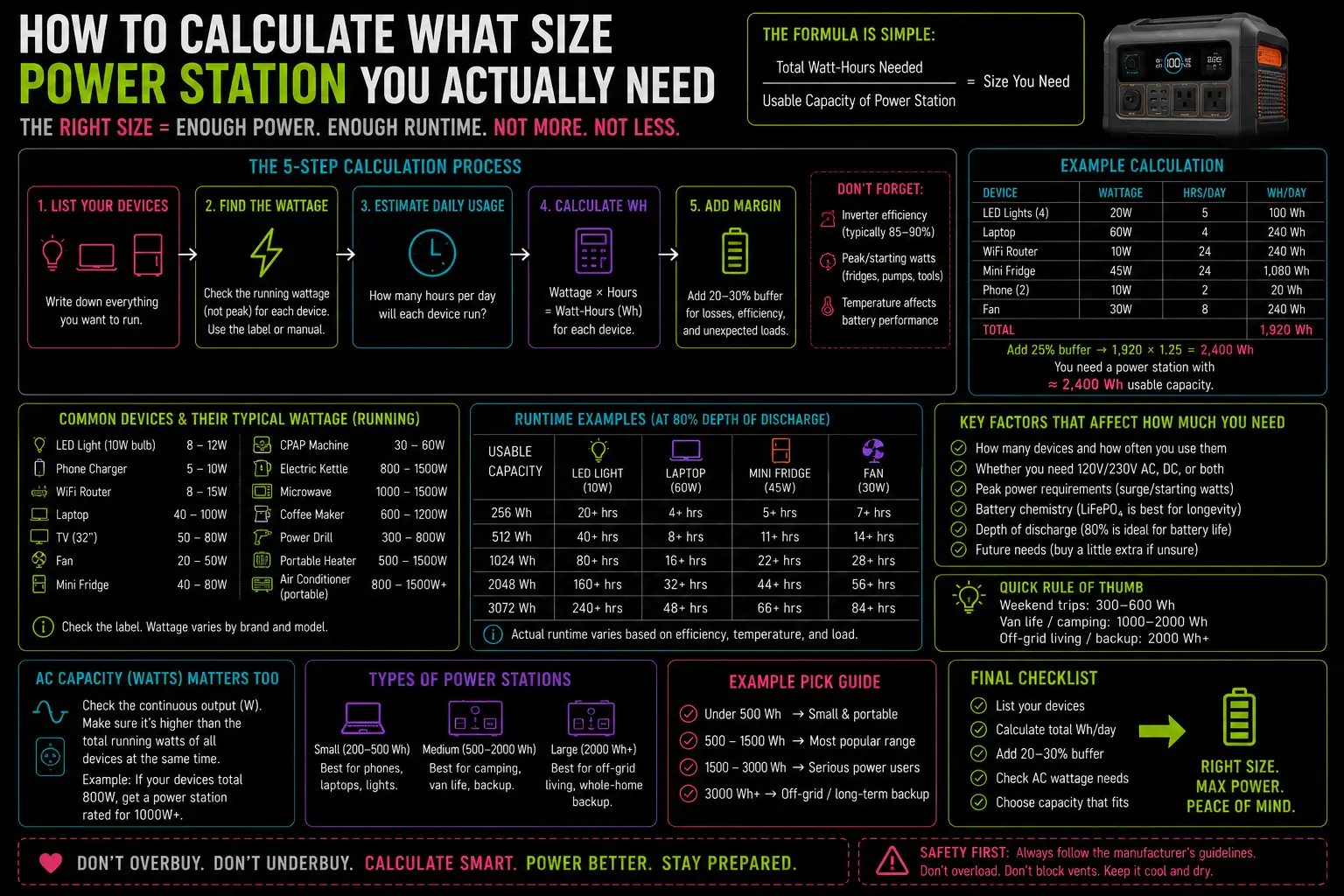
This is where most people go wrong. The nameplate or spec sheet on an appliance shows the maximum possible draw, not the average draw. A refrigerator rated at 700W doesn’t draw 700W continuously — it draws that only during the compressor startup cycle, which lasts seconds. The actual average draw while running is 100–200W for a modern Energy Star unit.
The best way: Use a Kill A Watt meter. Plug the device in, let it run for 30–60 minutes, and read the actual watt-hour consumption. This gives you a precise number with zero guesswork.
The reasonable shortcut: Look up your specific model on the Energy Star certified refrigerator database. Energy Star publishes annual estimated kWh usage for certified models — divide by 8,760 hours and you have the average hourly draw. For a modern 18–22 cubic foot refrigerator, that typically lands at 35–65W average.
Common real-world draws to use if you can’t measure:
| Device | Realistic Average Draw |
|---|---|
| Modern Energy Star refrigerator | 35–65W |
| CPAP (no heat, no humidifier) | 30–40W |
| CPAP (with heated humidifier) | 50–70W |
| Smartphone charging | 10–18W per phone |
| Laptop charging | 45–65W |
| LED bulb (9W equivalent) | 9W |
| Window AC, 5,000 BTU | 450–550W |
| Window AC, 8,000 BTU | 650–800W |
These are averages — individual models vary. But they’re close enough to get you within a useful range.
Step 3: Calculate Watt-Hours Per Device
Watt-hours = watts × hours running.
A refrigerator drawing 50W, running through an 8-hour overnight period: 50 × 8 = 400Wh.
A CPAP at 55W running 7.5 hours: 55 × 7.5 = 412Wh.
Two smartphones charging: 28W × 2 hours (full charge cycle) = 56Wh.
One laptop charged twice: 60W × 2 hours = 120Wh.
Four LED bulbs (9W each) running 6 hours: 36W × 6 = 216Wh.
Total from this example: 1,204Wh.
That’s how far real refrigerator draw differs from the nameplate rating — and why running the actual numbers matters more than reading spec sheets.
Step 4: Add the Efficiency Buffer
No power station delivers 100% of its rated capacity to your devices. Energy is lost in the DC-to-AC conversion inside the inverter — typically 10–15% depending on the unit and the load. A 1,000Wh battery running through a moderately efficient inverter delivers roughly 850–900Wh to your actual devices.
To account for this, add 20% to your calculated load. It’s slightly conservative, but it keeps you out of trouble.
1,204Wh × 1.20 = 1,445Wh as your target capacity.
This is the number you’re shopping for: a unit rated at or above 1,445Wh will cover your calculated load with the inefficiency buffer built in.
Step 5: Add the Coverage Window You Actually Need
The calculation above assumes one overnight cycle — approximately 8–10 hours. If you want two nights of coverage without solar recharge, double your target. If you’re planning to pair the unit with a solar panel, factor in your expected daily solar recovery.
A 200W solar panel in Florida summer, on a clear day, delivers roughly 800–900Wh of real recovery over a 5-hour solar peak window. A 400W panel doubles that to approximately 1,600–1,800Wh per clear day.
If your overnight load is 1,200Wh and you have a 200W solar panel, you’re recovering roughly 70% of that load each day through solar — meaning a 1,500Wh unit with one panel can theoretically loop indefinitely through clear-weather multi-day outages.
The math gets more complicated with cloudy days, which are common during storm recovery in Florida. A useful conservative estimate for storm-season solar recovery: assume 40–50% of rated panel output per day during a multi-day post-storm scenario. Build your sizing around that.
Worked Example: Patricia’s Setup
Going back to Patricia. Her actual overnight load:
| Device | Draw | Hours | Watt-Hours |
|---|---|---|---|
| Refrigerator | 48W | 8 hrs | 384Wh |
| CPAP (no humidifier) | 35W | 7.5 hrs | 262Wh |
| 2 smartphones | 28W | 1.5 hrs | 42Wh |
| 3 LED bulbs | 27W | 5 hrs | 135Wh |
| Subtotal | 823Wh | ||
| + 20% buffer | 987Wh |
Target capacity: approximately 1,000Wh.
A 1,000Wh unit — which she could have bought for $599–$799 depending on brand and timing — covers her load completely. Her 3,600Wh DELTA Pro covers it nearly four times over.
A Note on the Devices That Change Everything
Well pumps, sump pumps, medical oxygen concentrators, and central AC units land outside the typical range of portable power station coverage at any reasonable price point. Well pumps in particular draw 750–2,000W continuous with startup surges reaching 3,000W — beyond what a 1,000Wh unit handles at all, and beyond what a 3,600Wh unit handles for more than an hour or two.
If your critical load list includes any of these, the sizing calculation still applies — but your target number may push you toward a whole-home standby generator rather than a portable station. The math will tell you that. Don’t fight the math.
What to Do With That Number
Once you have your watt-hour target, add the 20% buffer and round up to the nearest common capacity tier:
- Under 1,200Wh: Shop the 1,000Wh tier — Anker SOLIX C1000, EcoFlow DELTA 2, Jackery Explorer 1000 Plus
- 1,200–2,000Wh: Shop the 2,000Wh tier — Jackery Explorer 2000 Plus, EcoFlow DELTA 2 Max
- 2,000–3,600Wh: Shop the DELTA Pro tier — EcoFlow DELTA Pro, Bluetti AC300
- Above 3,600Wh: You’re looking at dual-battery setups or whole-home solutions
For which units in each capacity tier are actually worth buying, that’s what the review posts are for.
The calculation comes first. The shopping comes after. In that order.

Lived through four major grid outages since 2021 — including Hurricane Ian (2022) and Helene (2024). Spent over $6,200 testing portable power stations and comparing them against whole-home standby generators before finding a setup that actually works. Not an electrician. Not sponsored by anyone. Just a homeowner who got it wrong the first time and documented everything the second time.
Why I started this blog: I wasted $3,400 on the wrong power station during Ian prep and I couldn’t find a single blog that gave me real runtime numbers — not the ones printed on the box. I decided to test everything myself and write it down.
What I do: I run real-world runtime tests on portable power stations and standby generators. I track how long they actually power a fridge, window AC, CPAP, and phone chargers — not under ideal lab conditions, but during Florida summers with actual loads. I compare real purchase prices, warranty experiences, and manufacturer support against what homeowners actually need after a storm.