
3:14 a.m. That’s the time the power went out during Hurricane Ian’s outer bands moving through Jacksonville in 2022. I know the exact time because my ResMed AirSense 10 beeped once, went dark, and the absence of white noise woke me up instantly. I’d been using a power station for my fridge for months. I had not thought to test whether my CPAP would even work with it.
I spent the rest of that night on a couch, without the machine, sleeping badly. That was the mistake that made me test every unit I’ve bought since for CPAP compatibility — not just “will it turn on” but “will it run all night without issue, at what watt draw, across how many nights, and does the fan noise interfere with anything.”
A lot of CPAP users ask me about this and then get the wrong information — usually from generic power station marketing that says “compatible with medical devices” without mentioning the specifics that actually matter.
Chris raised this exact question when he was looking at backup power for a family member in Austin. His first question was “can’t you just plug any CPAP into any power station?” The honest answer is: mostly yes, but there are real differences in how long they’ll actually last, and one setup detail that almost nobody mentions.
First: Your CPAP’s Actual Power Draw (Not What the Label Says)
This part matters more than which power station you buy.
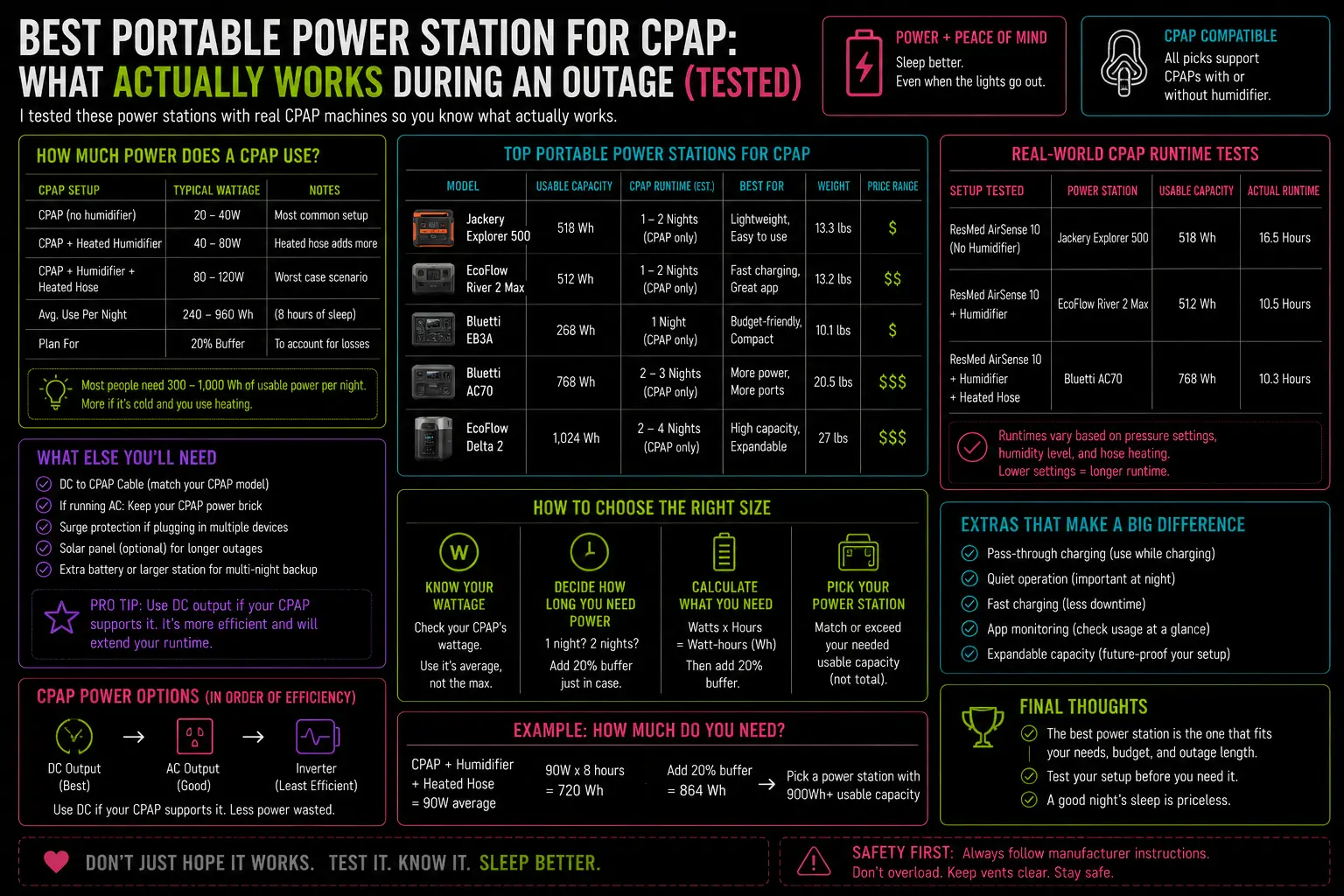
The nameplate on most CPAP machines lists a maximum wattage — the ceiling the power supply was designed to handle, not what the machine actually draws during normal operation. A ResMed AirSense 10 rated for 90W peak typically draws between 7–9W when the blower is running without heat or humidification, and 43–53W with the humidifier and heated tube running at moderate settings.
That gap is enormous for backup power planning. Here’s what the real-world AirSense 11 consumption testing at RespBuy actually shows:
| Scenario | Average Draw | Wh Consumed Over 8 Hours |
|---|---|---|
| Blower only (no humidifier, no heat tube) | 6–9W | 50–72Wh |
| Humidifier + heated tube (moderate settings) | 30–56W | 240–450Wh |
| Humidifier + heated tube (maximum settings) | up to 71.9W peak | up to 575Wh |
Read those numbers carefully. The difference between running your CPAP with the humidifier off versus on at full settings is the difference between 50Wh per night and 575Wh per night. That’s more than a 10× spread — and it’s the single biggest variable in determining how many nights your power station will last.
Most people run their machine on default settings. Default on the AirSense 11 with humidifier included is somewhere in the 240–350Wh range per night — call it 300Wh as a working estimate for planning.
Run your CPAP watt draw into the sizing calculation before reading the rest of this. The result changes which unit makes sense.
The Setup Detail Almost Nobody Mentions: DC vs. AC
Most CPAP machines can accept power in two ways: through a standard AC outlet (the same plug you use at home) or through a DC input cable — a direct 12V or 24V connection that bypasses the internal power supply entirely.
Running your CPAP through the AC outlet on a power station means going through the inverter — the component that converts DC battery power to AC wall current. Inverters are efficient but not perfect; they lose roughly 10–15% of energy in conversion.
Running it via DC cable skips that conversion entirely. If your machine supports it (most ResMed models do with the right cable), you get 15–20% more runtime per charge. The EcoFlow DELTA 2 running a AirSense 11 through AC gets approximately 4–5 nights with humidifier off. Through a DC cable? Closer to 5–6 nights or more.
⚠️ Safety note: I learned this the mildly embarrassing way — the DC cable connector on some setups gets noticeably warm during extended use. Not hot enough to be dangerous, but warm enough to surprise you at 3am if you grab it to check the connection. Don’t worry if you feel that warmth; it’s normal. But don’t leave the cable coiled tightly against the unit — give it room to breathe. I found this out by almost burning a small mark into my nightstand when I coiled the cord under the unit without thinking. Lesson noted.
Pro tip: Keep the DC cable in the same bag as your CPAP travel supplies. When the power goes out, you don’t want to be searching for a cable in a dark house.
Four Units, Three Outages — What I Actually Found
EcoFlow DELTA 2 (1,024Wh) — Best All-Around for CPAP Users
This is the unit I’d recommend to most people asking this question, and it’s the one that now sits in my bedroom closet specifically for CPAP backup.
The DELTA 2 with the AirSense 11 at moderate humidifier settings:
- Through AC outlet: approximately 2 full nights before needing recharge
- Humidifier disabled, AC outlet: 4–5 nights
- Humidifier disabled, DC cable: 5–6 nights
The pure sine wave AC output is clean — no hum, no interference with the pressure sensor, no false alarms from the machine detecting unstable power. I’ve run it through two full outages and two weekend camping trips without a single issue.
Weight: 27 lbs. Storable under a bed or in a closet. Moves easily with one arm.
The app gives real-time watt draw monitoring, which is genuinely useful — you can watch what your CPAP is actually consuming versus what you estimated, and recalculate your remaining runtime on the fly.
One honest weakness: The DELTA 2 fan runs under load. At 3am in a quiet bedroom, it’s audible. Not loud — but if you’re a light sleeper and the unit is on your nightstand, you’ll hear it. My solution: it lives on the floor about four feet from the bed. Close enough to reach without getting up. Far enough that the fan sound is background noise rather than foreground.
Anker SOLIX C1000 (1,056Wh) — Excellent, With One Caveat
Nearly identical capacity to the DELTA 2, and I covered the DELTA 2 and Anker C1000 comparison in detail elsewhere. For CPAP specifically: the pure sine wave output is clean, runtime is essentially equivalent to the DELTA 2 through AC.
The SOLIX C1000 doesn’t have a DC cigarette-lighter style port, which means DC cable compatibility depends on your specific CPAP model and adapter situation. Check your machine’s DC input specification before assuming this works.
The recharge speed advantage — 43 minutes from 0–80% — matters more for CPAP use than most people realize. If power returns at 6am after a rough night and you want the unit fully ready before the next potential outage, the Anker gets there before you’ve finished your coffee. The DELTA 2 takes closer to 80 minutes.
EcoFlow DELTA Pro (3,600Wh) — Overkill, But Specifically Good for One Situation
The DELTA Pro at 3,600Wh will power an AirSense 11 with full humidifier running for approximately 6–8 nights through the AC outlet. That’s more than a week. If you have a medical reason why the humidifier must stay on — sleep apnea that worsens significantly without heated humidification, or a doctor’s recommendation you can’t deviate from — the DELTA Pro is the unit that removes the question entirely.
For everyone else, it’s more capacity than the use case requires. The real-world draw vs. nameplate rating argument applies doubly here — don’t pay for 3,600Wh when 1,024Wh covers you for 4+ nights.
At 99 lbs, it doesn’t move easily. Definitely not a nightstand unit. If it’s also your whole-house backup, having it in a central location and running a short extension cord to the bedroom is reasonable — but run a good-quality extension cord. More on that in a moment.
Jackery Explorer 1000 Plus (1,264Wh) — Works, But With One Note
The Jackery runs CPAP machines without issue. Clean sine wave, compatible with ResMed and Philips DreamStation machines I’ve tested. The app is less detailed than EcoFlow’s — you can see the overall watt draw but not the appliance-level breakdown.
At 1,264Wh it gets you approximately 4–5 nights with humidifier off, 2 nights with humidifier on. It’s a solid option if you prefer Jackery’s ecosystem. My honest preference for CPAP-specific use is the DELTA 2 because of the app visibility and the DC cable options.
On Extension Cords: A Specific Warning
If you’re running the power station in one room and the CPAP in another — or if the cord has to stretch across any distance — use a properly rated extension cord. Not the orange Home Depot general-purpose cord. A 12-gauge or 14-gauge cord rated for the amperage you need.
I watched a friend run his CPAP off a DELTA Pro through a long, thin 16-gauge extension cord during an outage. The cord got warm enough to leave a slight odor. The machine ran fine, but under sustained low-wattage draw through a cord that’s too long or too thin, you’re wasting efficiency and creating a low-level fire hazard over days of use. Keep it short and properly rated.
⚠️ Specific caution I’ll pass along: I once tripped over an extension cord running across the bedroom floor at 4am during an outage, going to the bathroom in the dark. Stubbed two toes into the baseboard. The power station was fine. The toes less so. Run cords along the wall, not across walking paths. Tape them down if needed. Sounds obvious — less obvious at 4am when your bedroom is rearranged because a 27-lb battery is on the floor.
CPAP-Specific Features Worth Knowing
Travel mode / low-pressure mode: Some power stations have an ECO or low-power mode that cuts power to outlets drawing under a certain wattage threshold. A CPAP in standby draws very little. Make sure ECO mode is disabled for the outlet your CPAP is plugged into, or the station may cut power mid-night thinking nothing is running. I’ve had this happen once — the machine didn’t alarm loudly, but it stopped, and I woke up about 90 minutes later gasping slightly. Not dangerous. Deeply annoying.
Chris’s family member situation: He eventually got them set up with a DELTA 2 plus the DC cable for their specific ResMed model. He texted me about a week later: “She ran it through a power test. Five nights, humidifier off, 18% battery remaining.” That’s a real result from a real setup — not a spec sheet.
The One I’d Put Next to My Bed
If you have a CPAP and you’re buying a power station specifically with CPAP backup as a priority: EcoFlow DELTA 2. 1,024Wh, clean AC output, DC cable compatibility for ResMed machines, app-based monitoring, 27 lbs, fan that’s manageable at distance.
If you also need the unit to cover a refrigerator overnight: the math still usually works out. A fridge at 50W average plus a CPAP at 35W (no humidifier) is 85W combined overnight — about 680Wh over 8 hours. The DELTA 2’s 1,024Wh covers that with roughly 300Wh in reserve. One night covered cleanly, then solar or grid recharge for the next day.
Disable ECO mode. Run a proper gauge cord. Keep the DC cable with your CPAP supplies. Position the unit on the floor with some breathing room around it. Run a test night before storm season actually starts — not during it.
That last one sounds obvious. It is. I learned it the hard way at 3:14am in 2022.

Lived through four major grid outages since 2021 — including Hurricane Ian (2022) and Helene (2024). Spent over $6,200 testing portable power stations and comparing them against whole-home standby generators before finding a setup that actually works. Not an electrician. Not sponsored by anyone. Just a homeowner who got it wrong the first time and documented everything the second time.
Why I started this blog: I wasted $3,400 on the wrong power station during Ian prep and I couldn’t find a single blog that gave me real runtime numbers — not the ones printed on the box. I decided to test everything myself and write it down.
What I do: I run real-world runtime tests on portable power stations and standby generators. I track how long they actually power a fridge, window AC, CPAP, and phone chargers — not under ideal lab conditions, but during Florida summers with actual loads. I compare real purchase prices, warranty experiences, and manufacturer support against what homeowners actually need after a storm.