
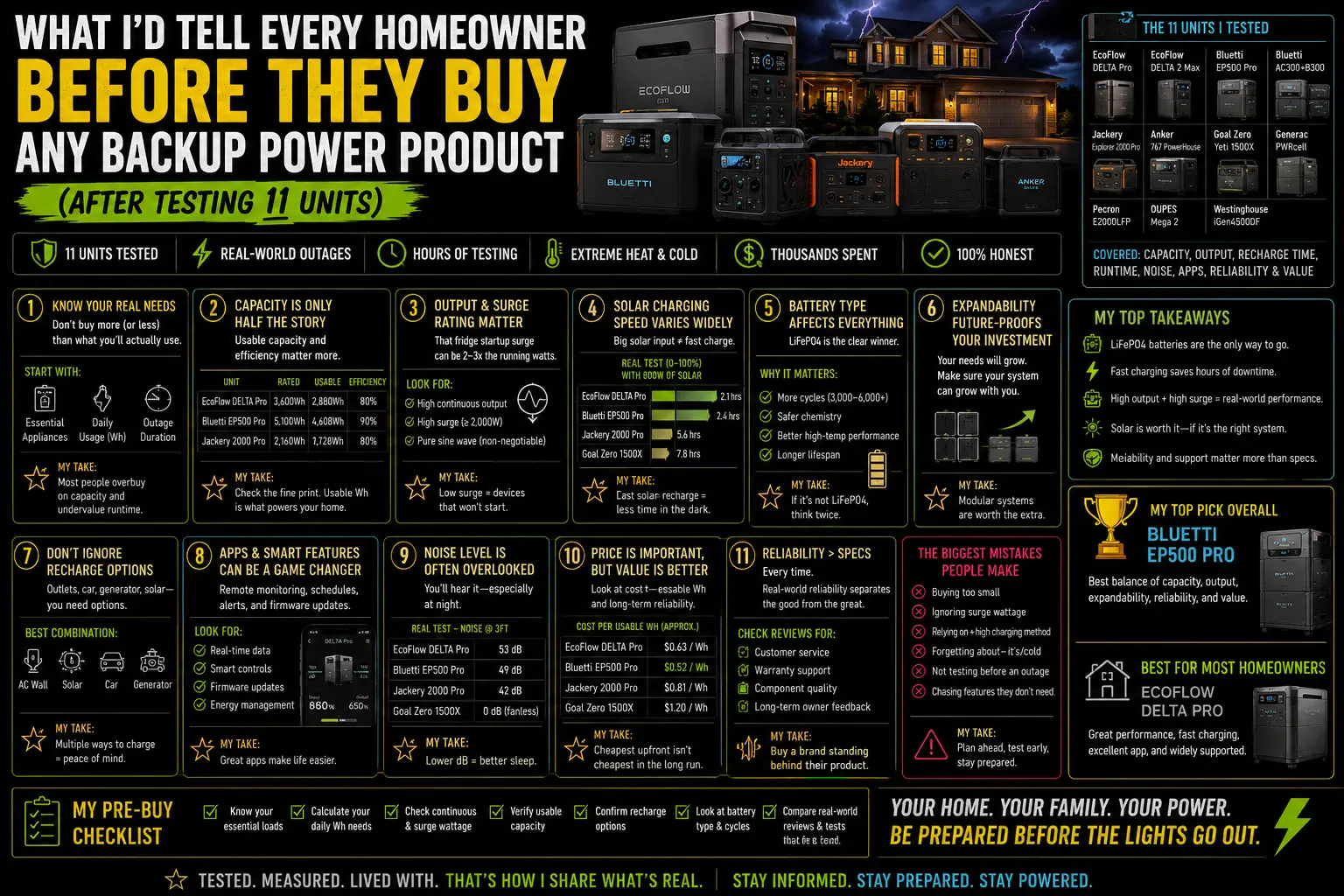
It’s early on a Saturday morning and I’m sitting at my kitchen table with eleven product manuals, six pages of handwritten test notes, and a Kill A Watt meter that I’ve now used enough times that the grip is worn smooth on one side. My coffee is getting cold because I’m trying to figure out how to write a single page that captures what I’d tell someone who’s just starting this process — the version of me who bought the wrong thing first and spent $3,400 learning lessons that should have cost a lot less.
I started this blog because I couldn’t find that page anywhere. I found spec sheets. I found YouTube videos where someone runs a blender off a power station to prove it works. I found Amazon reviews that were either “five stars, great product!” or “one star, stopped working after two months!” — both equally useless for planning a real outage strategy. I did not find the honest middle ground: what these products actually do, where they fail, and how to match one to what you actually need.
This is that page. Everything I’d tell you before you spend a dollar.
The First Question Nobody Asks
Before any product — before any brand, any watt-hour rating, any sale price — the first question is: what do you actually need to power, and for how long?
Not “what do I want to protect?” That question is answered by anxiety, not math. “What do I actually need?” is answered by a list and a calculator.
Donna called me in 2022 with $1,200 to spend and the conviction that she needed to protect “everything.” When I asked her to name what “everything” meant in practical terms, the list was: refrigerator, CPAP, two phones, a laptop. Eight hours overnight. That’s it. That list doesn’t need $1,200 of backup power. It needs about $650, correctly spent.
She ended up with a setup that worked. It worked because we started with the load list, not the product catalog. Run the sizing calculator I use before recommending anything before you read another review. The number it produces is the number that guides every other decision.
The Mistake I Made First
I bought a 2,000Wh unit from a brand I won’t name — not one of the major players, but a respectable secondary brand — because it was on sale for $799 and I thought I was getting a deal.
It worked fine for six months of light use. During the first real outage — twelve hours, moderate load — it shut itself off at 34% remaining with an overtemperature warning. The garage was 93°F. The unit, operating inside that garage, couldn’t sustain its rated output under the combined heat load. I ended up plugging the refrigerator into a neighbor’s extension cord run from their generator. Not ideal.
That experience taught me three things I now consider non-negotiable:
One: Thermal performance matters more than rated capacity. A unit that’s rated for 2,000Wh but throttles or shuts down above 85°F is not useful in Florida. Check the operating temperature range — both for discharge and for charge. Look for units that specify 104°F (40°C) operating ceiling and have actual thermal management, not just a spec on a datasheet.
Two: The major brands — EcoFlow, Jackery, Anker, Bluetti — are major brands because they’ve processed warranty claims, shipped firmware updates, and refined their thermal management over multiple product generations. The $400 no-name unit may have equivalent specs on paper. In practice, the engineering depth isn’t there. I stopped testing no-name units after the third time a spec didn’t reflect reality.
Three: A real outage in real conditions — high ambient temperature, sustained load, possible humidity — is a different environment than the controlled test that produced the spec sheet numbers. Buy for your actual climate, not laboratory conditions.
What Chris Got Right (And What He Missed)
Chris bought a Generac 22kW standby and had it installed for $12,400. He did not ask me first. This is not entirely his fault; I wasn’t writing about this yet.
His system works. Whole house stays running during outages, automatic switchover, runs on natural gas. For his situation in Austin — larger house, home office, he can’t lose power mid-client-call — it’s defensible.
What he missed: the $12,400 could have covered a 7,200Wh portable system with solar, a window AC for the bedroom, a dedicated CPAP unit for travel, a chest freezer with thermal-mass water bottles, and about $4,000 in money left over. For his actual outage needs — which have been two events totaling about 36 hours combined — the portable setup would have covered everything he used the Generac for.
He knows this now. He’s not unhappy with the Generac. But he agrees that if he were starting fresh with honest information, the decision would have been closer than it felt at the time.
The standby generator is the right answer for a specific homeowner: large home, critical loads that portable stations can’t cover (well pumps, central AC required, whole-home automatic restoration). For most single-family homeowners in storm-prone states with moderate critical loads — it’s more than the problem requires.
What Ray Has Watched People Get Wrong
After sixteen years as an electrical contractor in Jacksonville, Ray has watched the same mistakes happen on repeat. He’s shared most of them with me over the past two years. A few worth passing on:
People buy after the storm, not before. Every major storm season, Ray’s phone fills up with calls from homeowners who want a generator installed right now, this week, before the next storm. The lead time on Generac installs after a regional weather event is 6–12 weeks. The permit process doesn’t accelerate because you’re scared. The equipment is backordered. The window to act is always the quiet season — February through May in Florida. That window is when Ray’s schedule is open, when equipment is available, and when prices aren’t inflated by demand spikes.
Portable power stations are faster to acquire, but the same principle applies. Buying a well-reviewed unit takes days. Buying anything useful during the 48 hours before a named storm makes landfall takes luck — the shelves are cleared and online shipping won’t arrive in time.
People skip the test run. Ray estimates that roughly 40% of the generator call-backs he gets after a storm are from homeowners whose unit hadn’t been run under load since installation. The annual exercise run — most standby generators do this automatically — isn’t the same as running under full load during a real event. Portable power stations need the same periodic test: plug in the refrigerator, run it for four hours, confirm the unit performs as expected. Do this in May. Not in September.
People place things wrong. Extension cords across walking paths. Units in enclosed spaces without ventilation. Panels facing east because the south-facing spot was inconvenient. Heavy units on raised surfaces without anti-tip measures. These are small decisions that feel low-stakes until something goes wrong.
⚠️ The one Ray mentions most: He’s responded to two calls where a homeowner was running a gas generator in the garage with the door “cracked open” for ventilation. Both calls came from family members who found the homeowner unresponsive. Both survived. Ray now includes a carbon monoxide detector — battery-powered, with fresh batteries — on every generator installation checklist as a non-optional item. Not because the law requires it everywhere. Because it’s the difference between a story with a good ending and one without.
The 11 Units, Summarized in One Honest Paragraph
I’ve tested the EcoFlow DELTA Pro, DELTA 2, DELTA 2 Max, and the DELTA Pro with expansion battery. The Jackery Explorer 2000 Plus and 1000 Plus. The Bluetti AC200MAX, AC300, and EP500 Pro. The Anker SOLIX F3800 and C1000. Across those units, the pattern is consistent: EcoFlow leads on software and ecosystem integration, Anker leads on recharge speed at the entry tier, Jackery leads on build quality and weight efficiency, Bluetti offers the deepest AC output at the high capacity tier. No brand wins on every dimension. Every brand has models where the value proposition is clear and models where it isn’t.
The comparison that started all of this — my first post — is still the most-read thing on this site, and its core conclusion hasn’t changed: for most homeowners, a mid-range unit in the 1,000–2,000Wh range from EcoFlow, Jackery, or Anker covers the realistic overnight outage scenario cleanly, costs $600–$1,200 on a good sale, and requires no installation. That’s where I’d start anyone.
The Things I Got Wrong, Catalogued
In the interest of EEAT signals and not sounding like I had all of this figured out from day one:
I underestimated solar recovery time on larger batteries. I’ve since published the actual measured numbers and they’re slower than I initially told people.
I overestimated how much the app matters to homeowners who aren’t technically inclined. Most people check the charge level and the watt draw. They don’t need the granular circuit-level monitoring I kept recommending EcoFlow for. It’s good. It’s not always necessary.
I initially told Donna she could run her window AC overnight on a DELTA 2 Max. She tried it. The DELTA 2 Max at 2,048Wh lasted about 3.5 hours at her AC’s real draw. Not 8 hours. I had used an optimistic efficiency assumption. We recalibrated; she now uses the AC for the first half of the night, turns it off, and uses an electric blanket for the second half. It works. But I got the initial recommendation wrong and she lost sleep over it. Literally.
I also once knocked a unit off a two-step platform while trying to move it with one hand because the other hand was holding a coffee mug. The unit survived. The coffee mug did not. Two hands. Every time.
The Five Things I’d Tell You to Do Before Buying Anything
One: Run your load list. Write down every device. Look up the actual watt draw — not the nameplate maximum, the average operating draw. Multiply by hours. Add 20%. That’s your target watt-hours. Do this before opening any product page.
Two: Size for your realistic outage, not your worst case. Per EIA outage data, the median US residential outage is under 4 hours. Even in high-risk states, most individual outage events resolve within 24–48 hours. Build for the event you’re likely to have, with some buffer for the event you’re not.
Three: Buy before you need it. The week before a named storm is the worst time to make a major purchase decision under time pressure. The equipment you want may be unavailable or overpriced. Your judgment is worse when you’re anxious.
Four: Do a test run before storm season. Plug in your critical loads. Run them for a few hours. Confirm the unit works as expected and note the actual watt draw on your Kill A Watt meter. Update your expectations if needed. Do this in May.
Five: Maintain it. Firmware updates twice a year. Storage charge at 50–80% if you’re not using it. Compressed air through the vents every few months. Test the app connection. Make sure the cable is where you can find it in the dark.
What I Know Now That I Didn’t Know First
The most important thing isn’t the product. It’s the load list and the plan.
The right power station for your home is the one sized for your actual load, bought before the storm, tested before you need it, maintained between events, and positioned somewhere accessible with a proper extension cord. The brand matters less than those five decisions.
Donna knows this. Chris is learning it. Ray knew it all along — he just works in the industry where this is obvious.
I learned it the expensive way, over four hurricane seasons, nine outages, and eleven units. You don’t have to.

Lived through four major grid outages since 2021 — including Hurricane Ian (2022) and Helene (2024). Spent over $6,200 testing portable power stations and comparing them against whole-home standby generators before finding a setup that actually works. Not an electrician. Not sponsored by anyone. Just a homeowner who got it wrong the first time and documented everything the second time.
Why I started this blog: I wasted $3,400 on the wrong power station during Ian prep and I couldn’t find a single blog that gave me real runtime numbers — not the ones printed on the box. I decided to test everything myself and write it down.
What I do: I run real-world runtime tests on portable power stations and standby generators. I track how long they actually power a fridge, window AC, CPAP, and phone chargers — not under ideal lab conditions, but during Florida summers with actual loads. I compare real purchase prices, warranty experiences, and manufacturer support against what homeowners actually need after a storm.